XGIMI HORIZON 20 Pro Review
An owner review of the XGIMI HORIZON 20 Pro: where the optical lens shift wins, what the 4100-lumen and 20000:1 numbers really mean in a room, and the gaming limits nobody advertises.
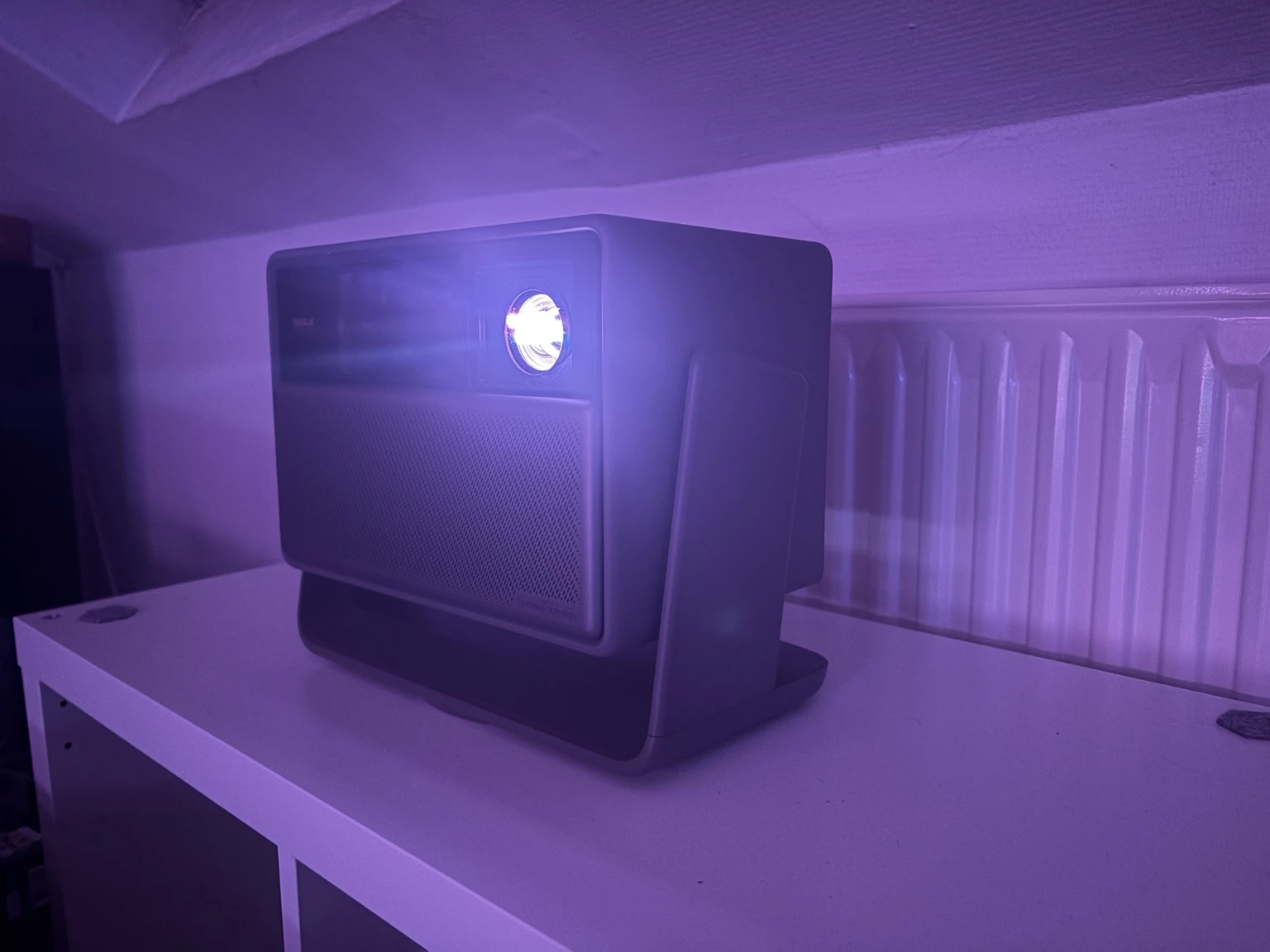
A projector that promises a cinema without the cinema room
The XGIMI HORIZON 20 Pro makes a very specific promise. It wants to deliver a genuinely large, vivid and flexible image without demanding the installation discipline normally associated with a dedicated home cinema.
That much sounds familiar. Plenty of lifestyle projectors promise easy setup, bright images and a built-in smart platform. What makes the HORIZON 20 Pro more interesting is that XGIMI did not stop at convenience. It also brings an RGB triple-laser light source, a 4K DLP imaging system, real optical zoom, mechanical lens shift in both axes, high-refresh gaming support and a far more serious approach to placement than most living-room models.
The result has an unusual character. It is bright enough to stay enjoyable when the room is not fully dark, colourful enough to make HDR content immediately attractive, and flexible enough to fit rooms where a traditional projector would be awkward to install. It is not, however, a dark-room reference machine, and the gap between what the specification sheet promises and what the projector does in a real room is wider here than on most products I have used.
This review is written from ownership rather than from a loan sample. I moved to the HORIZON 20 Pro after the Hisense C2 Ultra, and I use it on a large white screen in a home-cinema room, mostly with external sources rather than relying on the projector's own apps and processing. I have not run laboratory measurements, and I do not pretend to. What follows is how it behaves when you live with it.
Quick verdict
The HORIZON 20 Pro is a particularly strong choice for large-screen living-room viewing. It combines a vivid RGB-laser image, near-unique optical placement flexibility, genuinely good factory colour, a capable Google TV platform and surprisingly good built-in sound.
Its weaknesses are equally clear, and two of them are not weaknesses of the hardware but of how it is sold. The headline brightness figure belongs to a picture mode nobody would choose to watch. The headline contrast figure requires a processing feature that is better left switched off. Configure the projector honestly and you get a bright, colourful living-room machine with a visible black floor. On those terms it is very good. On the terms printed on the box it is not.
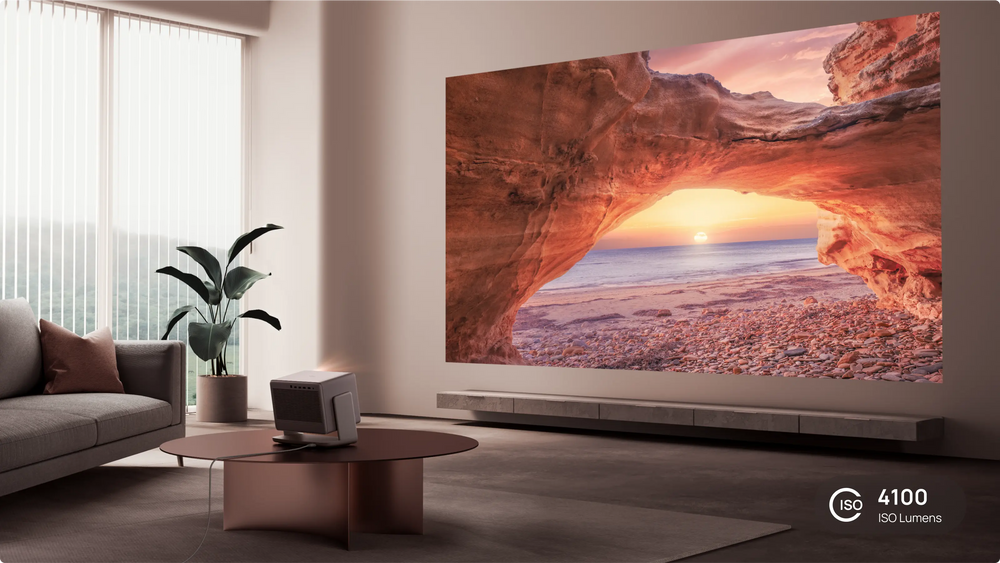
Where the HORIZON 20 Pro sits
The HORIZON 20 range sits above XGIMI's conventional lifestyle projectors, and the Pro is the middle of three models. All three share the same chassis, optics, lens shift, throw ratio, ports, audio and quoted latency. Only the light engine, power draw, weight and price differ.
| Model | XGIMI's brightness claim | Power | US launch price |
|---|---|---|---|
| HORIZON 20 | 3200 ISO lumens | Up to 180 W | 1,699 dollars |
| HORIZON 20 Pro | 4100 ISO lumens | Up to 230 W | 2,499 dollars |
| HORIZON 20 Max | 5700 ISO lumens | Up to 280 W | 2,999 dollars |
One detail matters more than the brightness ladder: the Pro and the Max share XGIMI's X-Master Red Ring lens, while the base HORIZON 20 does not. If optical quality is the priority, the step from the base model to the Pro buys more than lumens. It is also worth knowing that the real-world gap between the Pro and the Max is much smaller than the specification suggests, because the difference between two bright projectors in a normal room is far less dramatic than the difference between their ratings.
The projector uses a 0.47-inch DMD with a native 1080p panel and four-phase pixel shifting to reach 3840 by 2160. XGIMI's spec sheet simply lists 3840 by 2160 as the standard resolution and never mentions pixel shifting. In practice the distinction is less dramatic than the terminology suggests. From a normal seating distance the image is sharp, detailed and convincingly high-resolution. Only fine test patterns and very delicate structures reveal that this is not a native 4K panel.
Design and build
This is not a projector you throw in a bag. It measures 249 by 298 by 190 mm, weighs 4.9 kg, and the integrated stand adds to both its appearance and its usefulness. Dark metallic surfaces and a leather-like elephant-grey finish give it a more deliberate look than the average plastic lifestyle projector. Retro-futuristic is the word that keeps coming up, and it fits.
It looks like something that can stay visible in a living room without turning the space into a technology showroom. That is not trivial. Many projectors are designed around a ceiling mount or a permanent shelf, whereas this one looks comfortable on furniture.
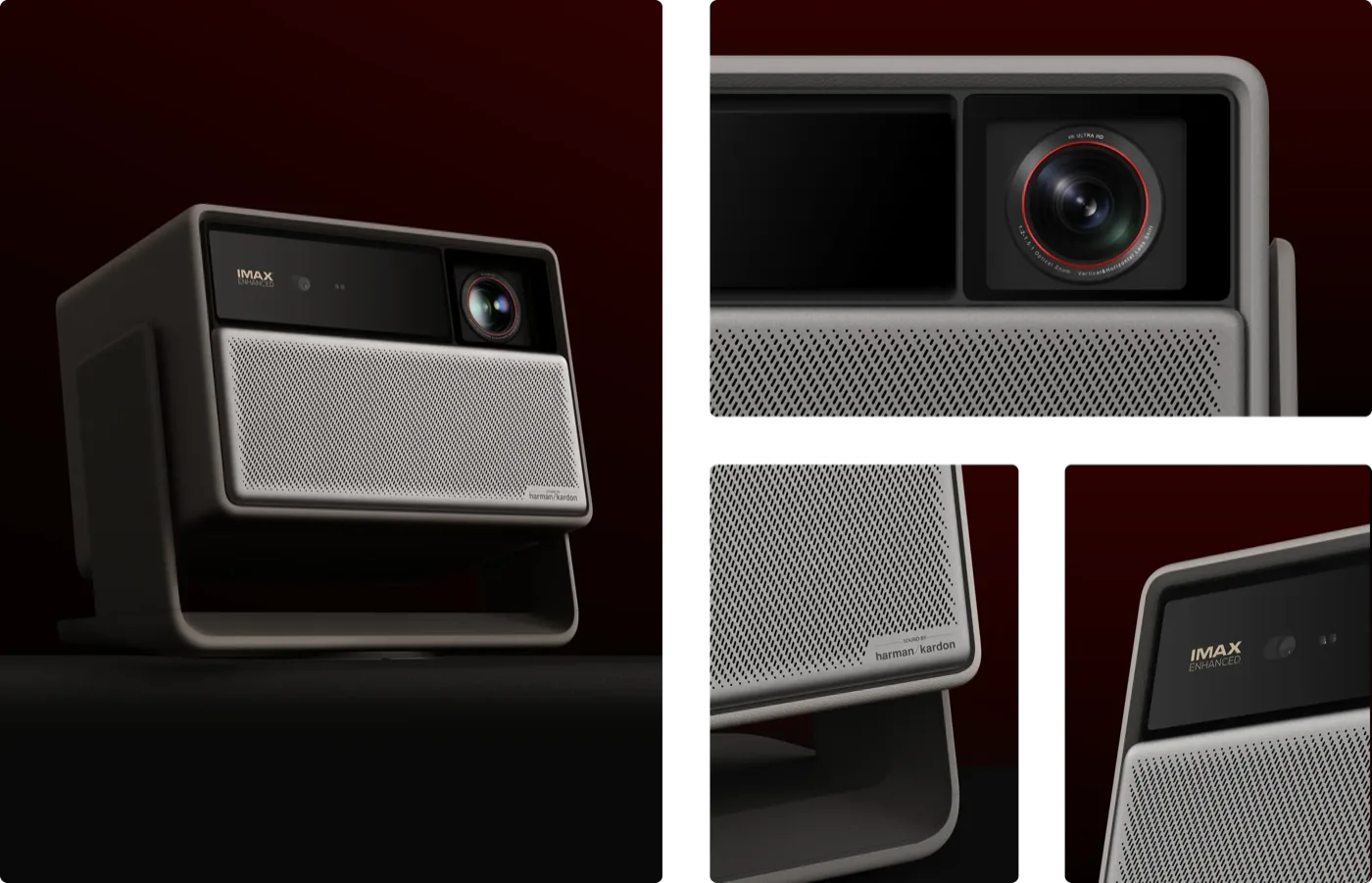
The integrated gimbal base is one of the most useful parts of the design. It rotates a full 360 degrees and tilts through a wide arc, and there is a standard quarter-inch thread underneath for tripod mounting. The redesigned stand also hides the power brick and routes the cable up through the leg, which fixes a long-standing cable-management complaint about the previous generation.
There are trade-offs. The stand is deliberately heavy, which resists tipping but makes the projector awkward to move, and there is no conventional handle. The gimbal is also easy to knock out of position, and there is no fine tilt adjustment to correct it with. The external power brick is large enough to spoil an otherwise tidy installation. Treat this as a transportable projector rather than a portable one. A foam transport case is included, which helps it move between rooms or go outside for a film night, but nobody is carrying this around casually.
Setup and placement: the real headline feature
The optical flexibility is where the HORIZON 20 Pro genuinely separates itself, and it is the thing I would buy it for.
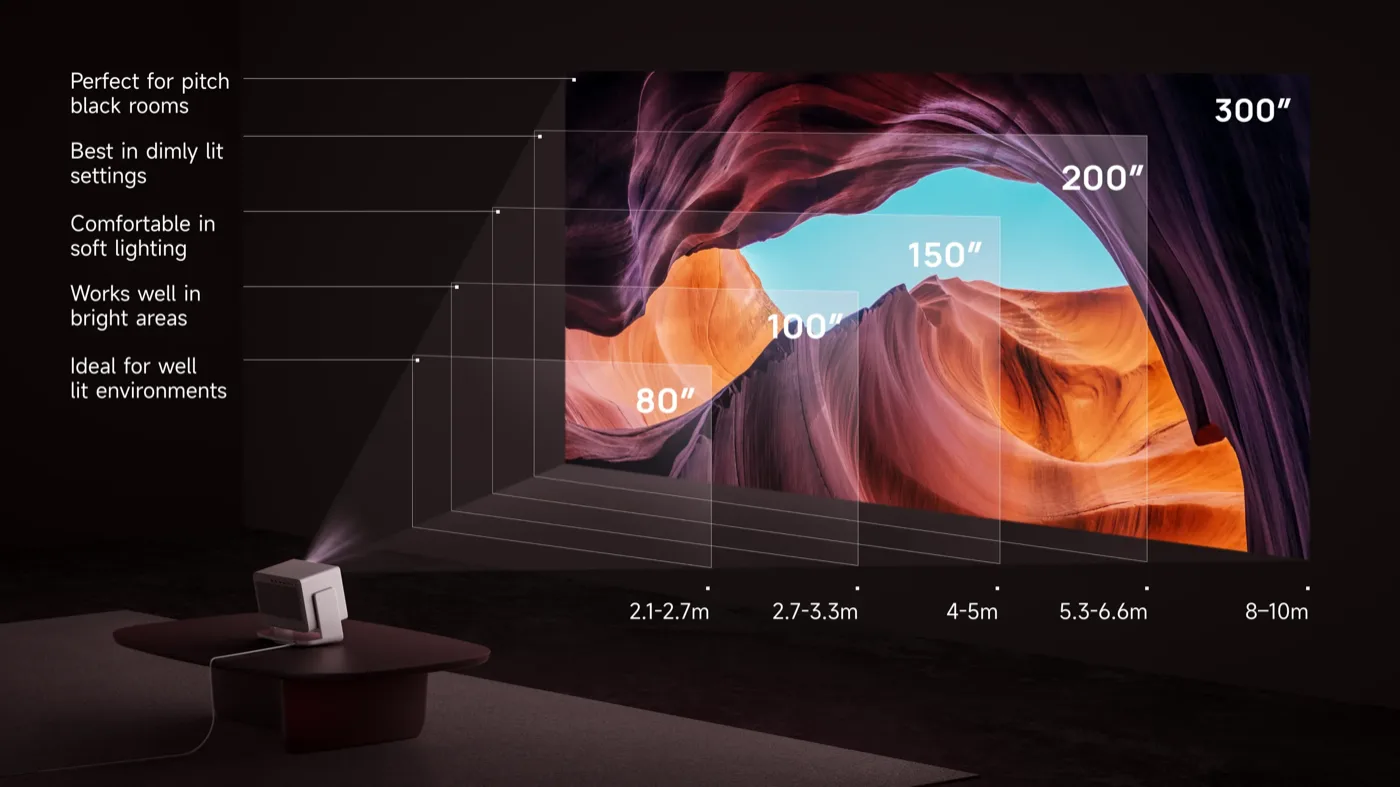
XGIMI quotes a throw ratio of 1.2 to 1.5:1, which works out to roughly 1.25 times optical zoom, and lens shift of plus or minus 120 percent vertically and plus or minus 45 percent horizontally. Image size runs from 40 to 300 inches. Optical adjustment matters because digital keystone and digital resizing cost usable resolution and add processing. When a projector can be positioned properly, optical adjustment is always preferable, and it is genuinely surprising to find it in this class of product.
There is an important caveat that XGIMI publishes only in a footnote, and it caught me out. Lens shift is mutually exclusive with the automation. When lens shift is active, auto keystone, auto focus, wall colour adaptation and eye protection are all disabled. The default lens position is 100 percent, leaving only a little additional upward travel and the full downward range. Horizontal shift is available only when vertical shift is set to zero, so fully up and fully across at the same time simply does not work.
That gives you two ways to live with this projector. The convenience route is to place it roughly where it needs to go and let XGIMI's ISA 5.0 system handle focus, alignment, obstacle avoidance and keystone. This works well, and autofocus has been reliable for me. The enthusiast route is to place the projector as squarely as you can and then fill the screen with optical zoom and lens shift, accepting that you lose the automation while you do it.
The second route is the right one if image quality is the priority. Automatic correction is a convenience feature, not a free upgrade. XGIMI's own notes are honest about the limits: the side throw angle must not exceed 40 degrees for keystone correction, intelligent screen alignment needs the image to cover the whole screen border and prefers a black-bordered screen, and obstacle avoidance does not guarantee avoiding all obstacles.
One genuine frustration is that some advanced optical controls are not available during the initial software setup, so if the projector sits somewhere awkward the first run is harder than it needs to be. The menus have the same problem throughout. Settings are greyed out with no explanation of how to enable them, zoom and lens shift live on separate pages, and backing out of a submenu can dump you out of the menu system entirely. You are not always sure whether a feature you just enabled is actually doing anything. Once configured it is easy to live with. Getting there takes patience.
Brightness: bright, but not as bright as the box says
The first impression is brightness. The projector produces a forceful image with real visual energy, and that holds up on a large screen. Highlights have impact, colours do not collapse when the image gets intense, and it remains enjoyable when the room is not perfectly dark. This is where it is most convincing. A living room with some residual light, or a film started before the room is fully dark, are exactly the situations where the light output becomes a practical benefit.
The 4100 ISO lumen figure on the box needs context, and XGIMI supplies it in a footnote: the rating is measured in Performance and High Power mode. That mode exists to validate the number rather than to be watched. It throws a visible green cast over the image, it locks out the picture settings, and the fans become loud enough to be a genuine distraction in a quiet room. Nobody who cares about the picture will leave it there.
In a colour-accurate mode you get meaningfully less light than the rating, and that is fine, because what remains is still bright. It is comfortably enough for a 100 to 150 inch screen in mixed light, and more than enough in the dark. If you want the biggest image the projector can throw, plan for a dark room. If you want to watch in daylight, plan for an ambient-light-rejecting screen and a more modest screen size.
A detail worth knowing is that the projector ships with brightness preset at the halfway point, and depending on your room you may want to turn it down rather than up. Laser power is adjustable in steps, and reducing it is a legitimate picture tool rather than a compromise: it lowers the black floor along with the peak, which in a dark room can look better than running flat out.
Colour: the quiet strength
Colour is where this projector is better than its reputation suggests. The RGB laser engine covers very nearly the whole DCI-P3 space and most of BT.2020, and the factory calibration is genuinely good. Out of the box in the right preset, colour errors are small enough that I have not felt the need to calibrate.
The condition is that you must choose the right preset, and this is the single most useful piece of setup advice for this projector. The default Standard mode does not use the full gamut and runs too cool, which is how a new owner ends up with bluish whites and concludes the projector is inaccurate. Switch to the Film or Movie preset and set colour temperature to D65. The difference is not subtle.
Two other processing defaults are worth changing. Motion smoothing is enabled by default in most presets and it is wrong by default, producing unnatural motion and visible artefacts, particularly on animation. The AI sharpness sliders are also worth disabling: they over-sharpen edges and give the image an unnaturally hard look. The optics underneath are excellent, with no chromatic aberration and no need for electronic help, so letting the lens do the work gives a cleaner result than any of the enhancement settings.
Black levels, and the DBLE problem
This is the projector's main limitation, and it is worth being precise about what it feels like rather than what it measures.
In mixed scenes the image has good depth and plenty of apparent contrast. Bright objects stand out strongly against their surroundings, and the picture rarely looks flat. That is a large part of why the projector looks so good with normal films, television and games. When a scene becomes predominantly dark, the limitation becomes easy to see. The black floor does not disappear, and dark areas look lifted compared with a projector built for a controlled room. Space scenes, night photography and dark interiors are where it shows, and letterbox bars are where it is most obvious, because they sit next to a bright image and glow slightly blue.
Then there is DBLE, which XGIMI calls Dynamic Black Level Enhancement. It modulates laser power in real time, and it is the only route to the advertised 20,000:1 figure. It does deepen blacks. It also visibly damages the colour while doing so, throwing a colour cast over the image and producing brightness pumping on scene transitions. The odd part is that owners and reviewers do not even agree on which direction the cast goes: reports include blue, green, mauve and red. That inconsistency suggests the behaviour varies between samples or firmware versions, and it is a fair sign that the feature is not finished.
My advice is the same as everyone else's who has spent time with it: leave DBLE off. That costs you the headline contrast figure and leaves you with the projector's native contrast, which is modest. That is the honest trade, and it is the configuration this review describes throughout.
One structural point explains the whole situation. The series has no iris. There is no mechanical modulation available, so the only lever XGIMI has for dynamic contrast is laser power, and laser power modulation is exactly what produces the colour drift. A physical iris would let the projector deepen blacks without touching the colour of the light, and its absence is the single biggest engineering difference between this and a projector built for a dark room.
HDR
The HORIZON 20 Pro supports Dolby Vision, HDR10+ and IMAX Enhanced on XGIMI's own specification sheet, and HDR10 and HLG work in practice even though XGIMI does not list them. Filmmaker Mode gets its own marketing section but is missing from the spec sheet's supported formats row, which is typical of how this product is documented.
In practice HDR on a projector is not a switch. The projector has to map a high-dynamic-range signal into the brightness and contrast limits of a projected image, and the quality of that tone mapping decides whether highlights survive and shadow detail holds together.
The result here is a genuinely attractive HDR picture, especially with content built around bright, saturated highlights. Fire, neon, sunlight and colourful production design all benefit, and HDR films look substantially more three-dimensional than SDR material once the projector is set up properly. Dolby Vision offers a Dark and a Bright profile; Dark is the one to use in a controlled room, while Bright runs cooler and is aimed at ambient light.
For my own viewing I prefer to manage HDR conversion and tone mapping on an external source rather than relying on the projector's internal processing. That gives more control and a more consistent result across content types, and the projector is capable enough to reward it. It remains perfectly usable as a standalone smart projector if you would rather not.
Gaming
Gaming is one of the HORIZON 20 Pro's most convincing uses. A big, bright, colourful image with sharp motion is exactly what console and PC games benefit from, and the projector is set up with that in mind. A few details about how the hardware is arranged are worth knowing before the first console is plugged in, because they decide which port and which settings to use.
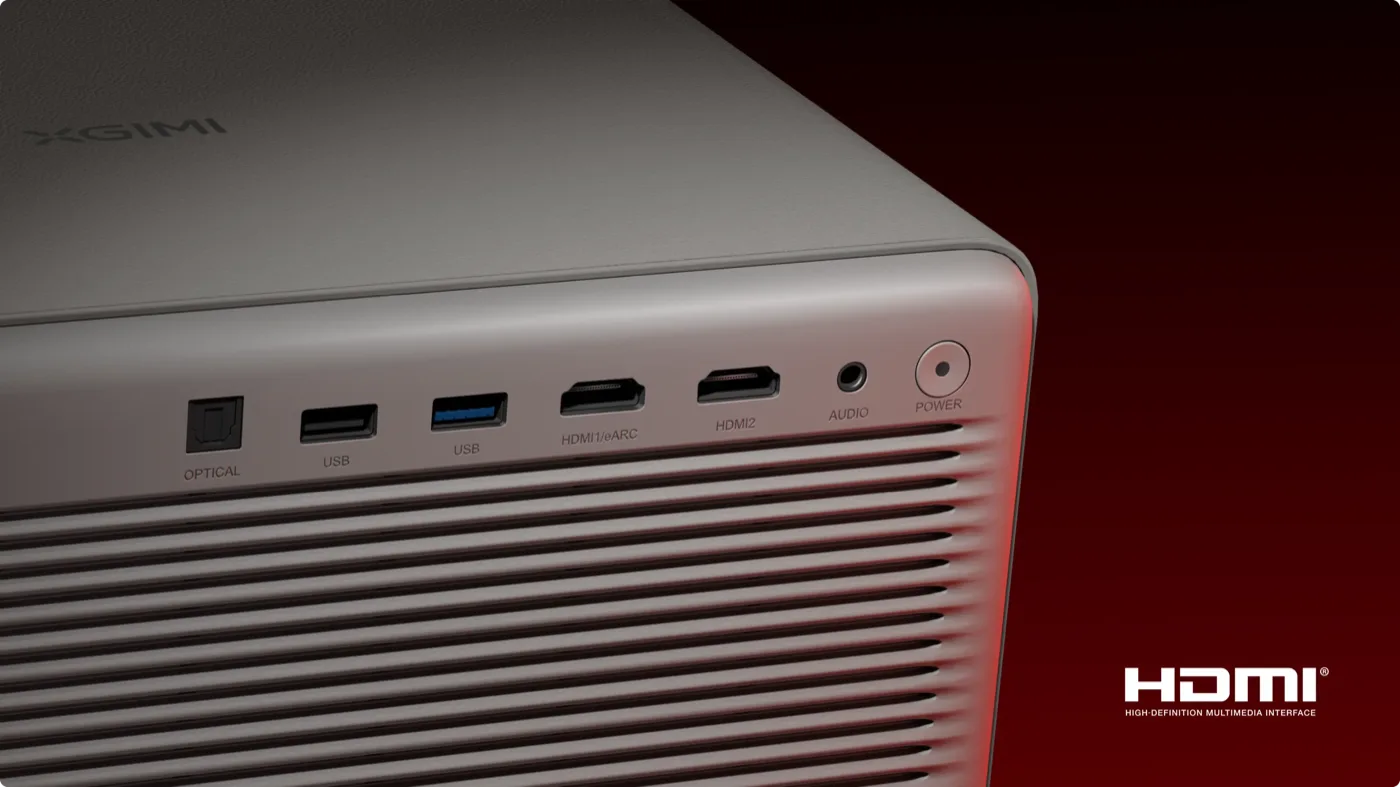
Start with refresh rate. XGIMI quotes 240 Hz, and that is available at 1080p. At 4K the projector runs at 60 Hz. The reason is the HDMI implementation: XGIMI's own footnote describes HDMI 1 as supporting the HDMI 2.1 TMDS protocol, which offers less bandwidth than a full-fat HDMI 2.1 port, so a 4K 120 Hz signal is accepted and shown at 60 Hz. In practice that means high refresh rates are a Full HD feature here, and 4K is a 60 Hz one.
Next, the latency mode. The Game picture preset is a picture look rather than the low-latency path, and choosing it on its own does not make the projector more responsive. The low-latency mode is a separate setting, and it is worth finding before judging how the projector feels with a controller, because once it is on the difference is immediate. Toggling ALLM by itself does not switch it on either.
Variable refresh rate works together with XGIMI's Super Frame processing, which lowers the output resolution while it is active. That makes VRR a 1080p feature in practice rather than a 4K one. The two HDMI inputs are also not identical: HDMI 1 carries eARC and runs 4K at 60 Hz, while the higher refresh rates and VRR are on HDMI 2. The sensible arrangement is a console on HDMI 2 and the audio return on HDMI 1, which works well as long as you only need one gaming source at a time.
A short word on latency figures. XGIMI quotes numbers in the low single-digit milliseconds, and figures measured with a camera over a whole signal chain come out much higher. Both describe something real, because they measure different things, and a DLP panel refreshes progressively so the result also depends on where on the screen it is taken. The number that matters is how it feels, and with the low-latency mode enabled it feels quick.
Set up that way, the experience is very good. At 1080p with a high refresh rate, motion is responsive and clean, fast movement stays sharp, and the size of the image gives games a presence a monitor cannot match. XGIMI has also announced genre picture presets, a black equaliser and a virtual crosshair, which are due to arrive through a software update.
For big-screen console and PC gaming this is a strong option. A player who wants 4K at 120 Hz with VRR at full resolution is asking for a different class of hardware.
Google TV, streaming and daily use
The built-in platform is a large part of why this works as a living-room projector. It does not need an external streaming stick for everyday use, and the interface feels close to a modern television rather than the basic Android menus of older projectors.
The important generational fix is Netflix. This is one of the few XGIMI projectors to ship with Netflix properly licensed, and it runs natively in 4K without the workarounds earlier models needed. The platform is fast, which is not something that could be said of every Google TV projector, and it runs on current silicon with Wi-Fi 6 and Bluetooth 5.2.
Two caveats. There is no Ethernet port, despite what some specification listings claim. XGIMI's own port list omits it and the rear panel confirms it. If you need wired networking, a USB adapter is the workaround owners use. Second, firmware maturity is a running theme with this generation. Individual streaming apps can misbehave in ways that are clearly specific to the projector rather than the service, and XGIMI has shipped features on a promise of later updates more than once. None of it is fatal, but it is a product that has improved since launch and will presumably keep doing so.
Sound
The integrated Harman Kardon system is much better than most projector audio. XGIMI specifies two 12 W drivers, with DTS Virtual:X, DTS-HD, Dolby Audio, Dolby Digital and Dolby Digital Plus decoding. Notably, XGIMI claims no Dolby Atmos support anywhere on its product pages, so any listing telling you otherwise is wrong.
Dialogue is clear, it plays loudly enough for a normal living room, and it has more body and low-end presence than the thin, boxy sound typical of compact projectors. For casual streaming, sport or a film night without external gear it is genuinely enjoyable, which is rare.
The consistent limit is the soundstage. It is narrow, with little stereo separation, and dialogue can sound slightly boxed in. No built-in speaker array can create the scale or separation of a real system, and this one has no subwoofer.
The connections make integration easy: HDMI eARC on HDMI 1, optical out and a 3.5 mm analogue output. The optical output is more useful than it looks, because older receivers can only accept stereo PCM over HDMI. In a serious cinema chain, treat the projector as the display and handle audio elsewhere, remembering that using eARC means giving up the gaming features on that port.
Noise, and the rainbow question
In normal use the projector is quiet, and more importantly the fan noise is constant. There is no hunting, no whine and no cycling up and down with scene brightness, which is the kind of noise that actually distracts. It only becomes a problem in High Power mode, where it turns into something closer to a small appliance. The lesson is the same as for brightness: avoid that mode.
The rainbow effect deserves a place in a buying decision rather than a footnote. This is a single-chip DLP projector, so colour break-up is possible by design. Reports genuinely conflict: some viewers find it a persistent low-level distraction on high-contrast content and subtitles, others barely notice it at all. That spread is normal, because sensitivity varies enormously between people. If you know you are sensitive to it, this is something to test in person rather than read about. Laser speckle is similarly disputed and, in my use, not an issue.
Against the Hisense C2 Ultra
This is the comparison I can speak to directly, because the C2 Ultra is what I used before, and our own review of it is on this site.
Start with what is genuinely a wash. Both are 0.47-inch DMD designs with pixel shifting, and both land in much the same place on contrast and usable brightness. Neither headline figure, XGIMI's 20,000:1 or Hisense's 2,000,000:1, describes anything a viewer sees, because both are dynamic numbers produced by processing rather than by the panel.
| HORIZON 20 Pro | Hisense C2 Ultra | |
|---|---|---|
| Throw ratio | 1.2 to 1.5:1 | 0.9 to 1.5:1 |
| Lens shift | Yes, vertical and horizontal | None |
| Maximum 4K refresh | 60 Hz | 60 Hz |
| VRR | Yes | No |
| Audio | Harman Kardon stereo, no subwoofer | JBL stereo plus a subwoofer in the base |
| Platform | Google TV, Netflix licensed | VIDAA U, Netflix licensed |
Two differences actually matter. The first is lens shift, and it favours the XGIMI decisively. The C2 Ultra has none. Both sit on a gimbal and both have optical zoom, so lens shift is the genuinely new capability, and it is the reason the HORIZON 20 Pro was easier to install properly in my room. The Hisense keeps one placement advantage of its own in the wider end of its throw range, which lets it fill a screen from closer in.
The second difference is gaming, and it is worth clearing up a myth because the specification sheets invite it. The C2 Ultra has the better port on paper, a full-bandwidth HDMI 2.1 input against the XGIMI's TMDS-limited one, and it carries a Designed for Xbox certification. It still does not display 4K at 120 Hz. It accepts the signal and downconverts it, exactly as the XGIMI does, and Xbox 1440p games are displayed at 1080p.
So both projectors cap at 4K 60 Hz, and neither is the 4K high-refresh machine its port specification hints at. That makes the XGIMI's bandwidth limitation much less costly than it first appears. What the XGIMI adds is VRR, which the Hisense lacks entirely, and much lower latency at 1080p. What the Hisense keeps is the wider bandwidth, which matters for future sources rather than for frame rate today.
One honest note on sound. Our C2 Ultra review called its audio a pleasant surprise, and that projector has a subwoofer built into its base. The HORIZON 20 Pro does not. It is a good projector speaker system, but it is not a bass upgrade over the Hisense.
In use, the HORIZON 20 Pro still feels like the more complete product to me. It is easier to place, the Google TV implementation is smoother, the picture has more punch and the colour is better out of the box. What I did not gain was a meaningfully better black floor. Both are living-room projectors with a visible black level, and neither becomes a dark-room machine because it supports premium HDR formats.
Against the rest of the field
The recurring alternative is the Valerion VisionMaster Pro 2, and it is the right one to consider if black level is your priority. It has clearly better native contrast and is the projector to choose for a dark, controlled room. What it does not have is lens shift, and the XGIMI is brighter and punchier in a room with any ambient light. That is the trade in one line: the Valerion for the cinema room, the XGIMI for the living room.
Elsewhere the picture is consistent. Several rivals at or below this price have better contrast but noticeably less brightness, which is the same bargain seen from the other side. Nothing in this class matches the HORIZON 20 Pro for placement flexibility. And anyone moving from an older lamp-based LCD projector will find the brightness and colour transformative while immediately missing the black floor, which is the honest summary of what a triple-laser DLP buys you and what it costs.
Price
The HORIZON 20 Pro launched in October 2025 at 2,499 dollars, 2,099 euros and 1,799 pounds, after being announced at IFA 2025. It has since fallen substantially in the US, where XGIMI's own store has listed it around a third below launch price. European pricing has not moved nearly as far, with Germany, France and the UK all still close to their launch figures.
At the discounted US price the value equation is substantially different from launch, and XGIMI has a consistent history of significant discounts during sales periods. If you are shopping in Europe, it is worth waiting for the regional price to follow the US one.
Who should buy it
The HORIZON 20 Pro suits someone who wants a large, bright and flexible image without the restrictions of a traditional projector installation. It makes particular sense for:
- living rooms where some ambient light is unavoidable
- screens between 100 and 150 inches, and larger in a dark room
- buyers who need off-axis placement without resorting to keystone correction
- colourful, animated and sports content, where the laser gamut shows
- big-screen gaming at 1080p, if you accept the Super Frame resolution trade
- renters who cannot install a fixed ceiling mount
- anyone who wants one box handling films, series, sport and games with usable built-in sound
It is the wrong choice for a dedicated dark room where black level is the first priority, for anyone who needs 4K at 120 Hz or VRR at full resolution, for anyone needing more than two HDMI sources, for viewers sensitive to rainbow artefacts, and for anyone who mistook it for a portable projector.
Final verdict
The XGIMI HORIZON 20 Pro is a powerful and unusually complete lifestyle projector, and its biggest strength is not brightness. It is the combination of real optical zoom, mechanical lens shift in both axes, a rotating stand and competent setup automation, which together make it far easier to install well than most projectors producing a comparable image. The RGB laser engine gives it excellent colour straight out of the box in the right preset. Google TV runs properly, Netflix finally works natively, and the Harman Kardon speakers are better than they have any right to be.
The compromises are real, and two of them are about how the projector is described rather than how it performs. The rated brightness belongs to a mode you would not choose to watch, and the rated contrast depends on a processing feature that works better switched off. What is left is a genuinely bright, colourful image with a black floor you will notice in dark scenes, 4K limited to 60 Hz, and a low-latency mode that takes a moment to find in the menus.
That sounds harsh, so here is the balance. Judged on what it actually is rather than what the box claims, it is very good. Compared with the Hisense C2 Ultra in my own room it is the more complete and better-rounded product, easier to place, nicer to use and more capable as a single-box solution. It does not become a reference cinema projector because it supports premium HDR formats, and it never claimed to be one in its engineering, only in its numbers.
The HORIZON 20 Pro is therefore not a universal winner. It is something more useful: a projector with a clear purpose. If you want a big, bright, colourful image in a real home rather than a perfectly controlled demonstration room, and you are willing to spend an evening in the settings menu getting it right, it is one of the most compelling options in its class.
Pros
- Optical zoom and mechanical lens shift in both axes, near-unique at this price and the single best reason to buy it
- Excellent colour coverage and good factory accuracy once set to Film and D65
- Genuinely bright enough for a living room with ambient light
- Excellent optics with no chromatic aberration and no need for electronic sharpening
- Quiet in normal operation, with constant fan behaviour rather than hunting
- Google TV is fast and Netflix is properly licensed and runs in 4K
- Built-in Harman Kardon audio is unusually capable for a projector
- 360-degree rotating stand, wide tilt range and a quarter-inch tripod thread
- Dolby Vision, HDR10+ and IMAX Enhanced support, with sensible HDR tone mapping
- Street price has fallen substantially from launch in the US
Cons
- The rated 4100 ISO lumens belongs to High Power mode, which is not a mode for everyday viewing
- Native black level is modest, and dark scenes and letterbox bars show it
- 4K is limited to 60 Hz, with high refresh rates and VRR available at 1080p only
- The menus take time to learn, and the low-latency mode is a separate setting from the Game preset